Web Data
Home › Web Data gathers public web services and catalogs: the ones that cover the whole world
in one alphabetical list, and those that cover one country in a submenu named after it. Each
opens in the Web Data pane on the right, beside the map it searches. Unless a section says
otherwise, they work in the web app too: their documents and tiles are fetched like any other.
They reach the network, so the AI Assistant asks before it runs their commands,
and plugins need the network permission. ui.dialog opens a panel on a search with "search"
({"name": "nasaEarthdata", "search": "sea surface temperature"}).
| Entry | What it gives | Section |
|---|---|---|
| ArcGIS Portal… | Public items on ArcGIS Online or another portal | Web services |
| Boundaries… | A country's administrative boundaries (geoBoundaries) | OpenStreetMap and administrative boundaries |
| Dynamical… | Weather and climate Zarr stores | Web services |
| Earthdata GIS… | NASA's Earth science imagery, maps and features | Web services |
| Fields of the World… | Agricultural field boundaries, worldwide | Fields of the World |
| GeoLens… | A GeoLens server's vector datasets | Web services |
| Hugging Face… | Geospatial files in Hugging Face datasets | Web services |
| NASA Earthaccess… | NASA Earthdata granules (ICESat-2, GEDI, HLS…) | NASA Earthaccess |
| NASA Earthdata… | NASA GIBS imagery, day by day | NASA Earthdata |
| Natural Earth… | Natural Earth map data | Natural Earth |
| Ocean Data Platform… | HUB Ocean's marine datasets | Web services |
| OpenAerialMap… | Drone and aerial images | Web services |
| OpenStreetMap… | OpenStreetMap features where the map is | OpenStreetMap and administrative boundaries |
| Overture Maps… | Buildings, places, transportation and more | Overture Maps |
| Planet Open Data… | Planet's disaster imagery | Planet Open Data |
| Portolan… | Open data catalogs published with Portolan | Portolan |
| Satellite Embeddings… | AlphaEarth, Earth Index and Tessera embeddings | Satellite embeddings |
| Search Open Data… | data.gov, CKAN, Socrata and ArcGIS Hub datasets | Open-data portals |
| Sentinel-2 Explorer… | Recent, clear Sentinel-2 scenes | Sentinel-2 Explorer |
| Source Cooperative… | Files on Source Cooperative | Source Cooperative |
| STAC Search… | Any STAC API or static catalog | STAC catalogs |
| Vantor… | Vantor's (formerly Maxar's) disaster imagery | Vantor |
| France › IGN LiDAR HD… | IGN's LiDAR HD point clouds | Web services |
| United States › … | EnviroAtlas, FEMA NFHL, Tennessee GIS, The National Map, US Federal/State/Local GIS, USGS 3DEP DEM, USGS LiDAR, USGS NLDI | United States |
Data added by its address, from a web server or an S3 bucket, is described in Data and Files on the web.
STAC catalogs
Home › Web Data › STAC Search… searches a STAC API for imagery and
other assets: by collection, dates, the most cloud cover and (by default) where the map is. The
default API is Element 84's Earth Search
(Sentinel-2, Landsat, NAIP, Copernicus DEM and Sentinel-1 on AWS); Microsoft's Planetary
Computer is offered beside it, and any
STAC API with item search works. Collections lists what the API offers, and Find Items shows up to 50 items as cards
(with "Showing 50 of 1234 items" when the API says how many match) and draws their footprints as
a layer. Each card has the item's preview picture when it has one, its id, a collection · date ·
cloud cover line, and Zoom (to the item), the asset to add, Add and Details (the item's
properties). The asset chosen at first is visual (true colour) when there is one, else the first
GeoTIFF, else the first point cloud, else the first data asset. A cloud-optimised GeoTIFF is read in place, the tiles each view needs by range
(see Files on the web); other assets download whole.
The commands do the same: stac.collections ("url"), stac.search ("collections",
"bbox" as [west, south, east, north] or "view", "datetime" such as
2024-06-01/2024-06-30, "limit", "maxCloud", "footprints", and "properties": true for
every property of each item rather than its date and cloud cover), and stac.addAsset with
an item stac.search returned ("item") or an item's address ("url") and "asset":
rustgis-cli run --cmd 'stac.search={"collections":"sentinel-2-l2a","bbox":[7.4,46.9,7.5,47],"datetime":"2024-07-01/2024-07-31","maxCloud":20}' --cmd 'stac.addAsset={"url":"https://earth-search.aws.element84.com/v1/collections/sentinel-2-l2a/items/S2B_32TLS_20240727_0_L2A","asset":"scl"}'
Assets are added by their web address: one in a cloud store's own protocol (s3://) is refused
with a message saying so, and an item on the web can't point into the local network. A Planetary
Computer asset (in Azure Blob Storage) is signed first: RustGIS asks the Planetary Computer's
token service for its storage container's token and reuses it for half an hour. The token is part
of the layer's address, so a project saved with one reads it again only while the token lasts
(about an hour): add the asset again after that. A ?stac= link opens the web app on an item or a
collection (web app links). Searches reach the network, so the AI
Assistant asks before it runs them, and plugins need the network permission.
Data cubes on the time slider
When the items found span several dates, Add as Time Series (desktop; stac.addCube) adds a
band of them as a data cube: a collection's cloud-optimised GeoTIFFs, with one file per tile, date
and band, such as INPE's Brazil Data Cube or Sentinel-2 on Earth Search.
- Search: the collection is searched over the area (the map's, or
"bbox") and the period ("start","end"), page after page, up to 2,000 items. - Grouping: items go by the grid tile they cover (
grid:code,s2:mgrs_tile, Landsat's WRS path and row, the Brazil Data Cube'sbdc:tiles, else their bounding box), and by day. - Layers: each tile becomes a tile layer read in place, a file per date. The time slider shows the last date in its window, and a tile with no date in it draws nothing. The slider turns on over the dates when it is off.
- Range: a fixed
"range"([0, 0.9]for NDVI) is the same for every date and tile, so a grey means one value throughout. It is in the band's own units: itsraster:bands(oreo:bands) scale and offset turn it into the files' stored values. Without one, each file is stretched on its own, between its 2nd and 98th percentiles. - Saved with the project: each tile's dates and addresses.
- Web app: a server that doesn't allow the browser to fetch its files (CORS), as the Brazil Data Cube's doesn't, works on the desktop only.
rustgis-cli run --cmd 'stac.addCube={"url":"https://data.inpe.br/bdc/stac/v1","collection":"S2-16D-2","asset":"NDVI","bbox":[-55.9,-12.6,-55.5,-12.35],"start":"2024-08-01","end":"2025-06-30","range":[0,0.9]}' --cmd 'time.export={"path":"ndvi.gif"}'
Static catalogs
Many catalogs are plain files rather than an API: a catalog.json linking to child catalogs and
collection.json files, which link to their items. Give STAC Search the address of one (or pick
Planet Open Data, Portolan or Vantor Open Data from its list) and the Collection row becomes
Catalog: its child catalogs and collections are listed, and picking one shows its own children
(an ↑ entry goes back up; Browse reads the list again). Find Items walks the catalog from
the one picked, several documents at a time, and keeps the items that match the dates, the most
cloud cover and, with Only where the map is ticked, the map's extent. It lists the first 50 items it finds that match, sorted by date (the walk goes in the catalog's
order, so in a large catalog these aren't the earliest or latest: pick a catalog further down for
others). Undated items, and items without a footprint, are kept. A collection whose data
are its own assets (as many Portolan collections' GeoParquet and PMTiles files are) is listed as
an item of its own. A walk reads at most 400 documents and goes at most 8 catalogs deep; when it
stops early, it says so: pick a catalog further down. Items are added as from an API: a
cloud-optimised GeoTIFF is read in place, GeoParquet and FlatGeobuf by range, PMTiles a tile at a
time.
stac.collections with a static catalog's "url" lists its children ("id" is each one's
address), and stac.search walks one, with "phase" ("pre" or "post") for catalogs of events:
rustgis-cli run --cmd 'stac.search={"url":"https://vantor-opendata.s3.amazonaws.com/events/Mexico-Hurricane-Simon-Oct-2026/collection.json","phase":"post"}'
The services below are STAC Search opened on one API or catalog, with the dialog titled after
the service. Their commands (ui.stac.planet, ui.stac.portolan, ui.stac.sentinel2,
ui.stac.vantor, ui.stac.usgsLidar) take "catalog" (a catalog's or collection's address to
start from), "phase" and "search": true (find items at once).
Planet Open Data
Home › Web Data › Planet Open Data… browses Planet's disaster data
releases on Source Cooperative: imagery of earthquakes,
floods, fires and storms from PlanetScope, SkySat and Pelican, before and after the event, licensed
CC BY-NC 4.0. Pick an event (and, below it, its pre-event or post-event imagery or one collection),
then Find Items; Add adds a scene's visual image.
Portolan
Home › Web Data › Portolan… opens the Portolan
registry, a catalog of the open data catalogs
published with Portolan (cities, regions and agencies, most in Europe). Pick a publisher's catalog,
then a theme or collection, then Find Items: each collection's files (GeoParquet, PMTiles and
others) are listed, and Add adds the one chosen (visual first, often a PMTiles archive).
Sentinel-2 Explorer
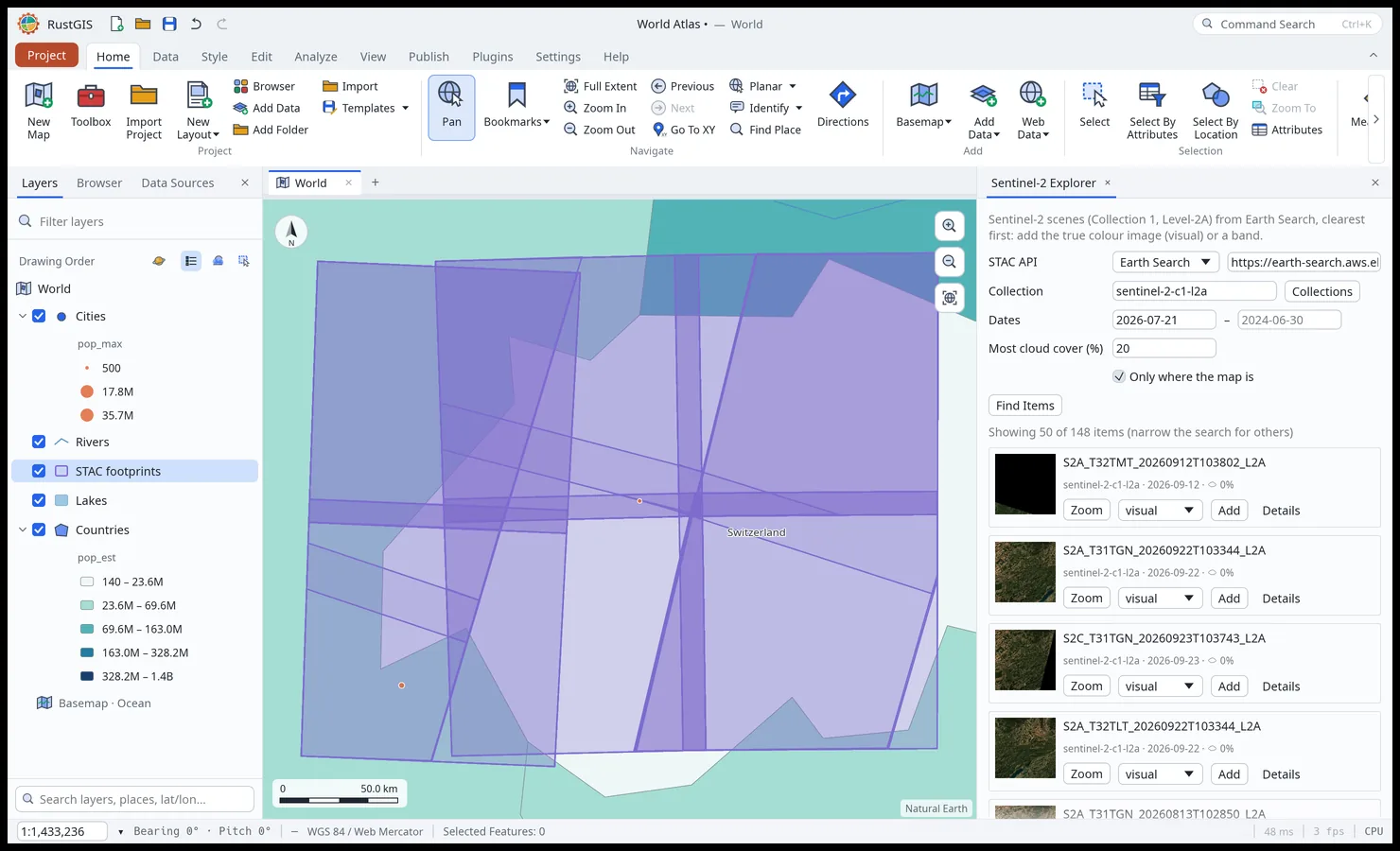
Home › Web Data › Sentinel-2 Explorer… searches Earth Search's Sentinel-2 Collection 1 Level-2A
scenes (sentinel-2-c1-l2a) where the map is, over the last 90 days and with at most 20 % cloud
cover, clearest first (sorted by cloud cover). Add adds the true colour image (visual);
the asset list beside each scene offers its bands (red, nir, swir16, scl…), each a
cloud-optimised GeoTIFF read in place. stac.search sorts with "sortby"
("eo:cloud_cover", "-datetime" for newest first) on APIs that sort.
Vantor
Home › Web Data › Vantor… browses Vantor's open data (formerly Maxar's
Open Data program): very high resolution imagery of disasters, one collection per event. Pick an
event and a phase (before or after the event), then Find Items; Add adds a scene's
visual cloud-optimised GeoTIFF.
USGS LiDAR
Home › Web Data › United States › USGS LiDAR… searches the USGS 3D Elevation Program's LiDAR
point clouds on the Planetary Computer (3dep-lidar-copc) where the map is: zoom to a town first.
Each tile's data asset is a COPC file, signed with the Planetary Computer's token and added as a
LiDAR point cloud (an evenly spread sample of its points, see Formats). A tile is
downloaded whole, often tens of megabytes, so adding one takes a while.
Overture Maps
Home › Web Data › Overture Maps… adds Overture Maps' open data:
buildings, places, transportation (segments and connectors), administrative divisions, base
layers (land use, land, land cover, water, infrastructure, bathymetry) and addresses, from the
latest release (or one named with "release"). Two ways:
- The features where the map is. A theme's type is a few hundred GeoParquet files, each covering an area; Overture's STAC catalog gives every file's extent, so only the files that cover the map's view are read, in place by range like any GeoParquet by address (see Files on the web), and each becomes a layer read a view at a time. Zoom to a city or smaller: a view that takes more than six files is refused (a country takes dozens).
- Map tiles of the whole world, from the theme's PMTiles archive: every zoom, drawn a layer per type. Some themes' tiles hold their features only when zoomed in (places from zoom 14).
overture.add does the same ("theme", "type", "bbox" or the view, "tiles": true for the
tiles):
rustgis-cli run --cmd 'map.zoomToExtent={"extent":[7.40,46.93,7.47,46.97]}' --cmd 'overture.add={"theme":"buildings"}' --cmd 'overture.add={"theme":"transportation"}' --cmd 'share.exportMap={"path":"bern.png"}'
The data's licences differ by theme (OpenStreetMap's ODbL for most, CDLA Permissive 2.0 for places); the layer says which.
Source Cooperative
Home › Web Data › Source Cooperative… lists Source Cooperative's
featured products (or an account's), browses a product's folders and adds a file by its address on
the data proxy (https://data.source.coop/<account>/<product>/…): GeoParquet, FlatGeobuf,
cloud-optimised GeoTIFFs and PMTiles are read in place, other files downloaded.
sourcecoop.products ("account") and sourcecoop.list ("account", "product", "path")
list them; a listed file's "url" is added with layer.addUrl. Like STAC searches, these reach the
network: the AI Assistant asks first and plugins need the network permission.
Natural Earth
Home › Web Data › Natural Earth… is the Source Cooperative browser locked to
Natural Earth's public domain map data as Source Cooperative
holds it (opengeos/natural-earth): countries, states, coastlines, land, ocean, rivers, lakes,
glaciers, urban areas, airports, railways and more. It opens on the pmtiles/ folder, whose
archives are added as tile layers read in place; the geoparquet/, geojson/, gpkg/ and
shapefiles/ folders hold the same themes as files, added as layers. With commands:
sourcecoop.list ({"account": "opengeos", "product": "natural-earth", "path": "pmtiles/"}), then
layer.addUrl with a file's "url".
Fields of the World
Home › Web Data › Fields of the World… adds the agricultural field boundaries the
Fields of the World model found in Sentinel-2 imagery, worldwide, one
year at a time (2017 to 2025; 2nd Edition, CC BY 4.0). Each year is a PMTiles archive on Source
Cooperative read in place. Fields are drawn from zoom 9, filled and outlined by the model's score
(0 to 100: red below 45, through orange and yellow, to green from 80); zoomed out, field density
cells are drawn instead, coloured by the share of each cell covered by fields: Add field
boundaries and Add field density add each. Score threshold hides the fields scoring below
it. fieldsOfTheWorld.add does the same ("year", "draw":
both, fields or density, "minScore"):
rustgis-cli run --cmd 'map.goToXY={"lon":-93.6,"lat":42.03,"scale":40000}' --cmd 'fieldsOfTheWorld.add={"year":2024,"minScore":40}' --cmd 'share.exportMap={"path":"fields.png"}'
The look is the tile layer's own style layers (map.addTiles takes MapLibre style layers as
"styleLayers", drawing vector tiles in place of their default colours).
OpenStreetMap and administrative boundaries
Home › Web Data › OpenStreetMap… (osm.download) downloads OpenStreetMap data where the map
is from an Overpass server: a preset (buildings, roads, railways, water,
land use, parks, points of interest or administrative boundaries) or tag filters such as
amenity=cafe, shop. The answer becomes up to three layers, points, lines and polygons: closed
ways that are areas (buildings, land use and the like, as OSM reads their tags) are polygons, and
multipolygon and boundary relations are assembled from their members. A layer's fields are its 25
most common tags, the rest in other_tags as GDAL writes them. The area can be up to 0.25 square
degrees (about 50 × 50 km), and an answer up to 50,000 elements: the public servers are shared, so
a larger area is better read from an extract (.osm.pbf). "url" names another Overpass server
when the public one is busy.
Home › Web Data › Boundaries… (boundaries.add) adds a country's administrative boundaries from
geoBoundaries (CC BY 4.0): the country itself (ADM0), its states
or provinces (ADM1) and finer divisions down to ADM5 where they exist, simplified for the map.
boundaries.countries lists the countries.
rustgis-cli run --cmd 'osm.download={"bbox":[7.44,46.944,7.456,46.952],"preset":"buildings"}' --cmd 'boundaries.add={"country":"KEN","level":"ADM1"}'
Both reach the network: the AI Assistant asks before it runs them, and plugins need the network permission. OpenStreetMap data is © OpenStreetMap contributors (ODbL).
NASA
NASA's data comes two ways: NASA Earthdata… adds imagery that NASA serves as map tiles, and NASA Earthaccess… finds the data files themselves. Earthdata GIS… (see Web services) searches NASA's portal of map and feature services.
NASA Earthdata
Home › Web Data › NASA Earthdata… lists the layers of NASA's
Global Imagery Browse Services
(GIBS) in Web Mercator: more than a thousand layers of satellite imagery and science data (MODIS,
VIIRS, Landsat, sea surface temperature, aerosols, fires…), grouped by mission or instrument (the
first part of their names) and searched by words. Most layers change day by day: Date
(YYYY-MM-DD) picks the day they are added at, and empty adds the service's default (its latest).
The same layer can be added at several dates, each a layer named with its date. A WMTS layer with a time dimension works the same way in any service,
and with commands service.add takes "time":
rustgis-cli run --cmd 'service.add={"url":"https://gibs.earthdata.nasa.gov/wmts/epsg3857/best/1.0.0/WMTSCapabilities.xml","layer":"MODIS_Terra_CorrectedReflectance_TrueColor","time":"2024-06-01"}' --cmd 'share.exportMap={"path":"gibs.png"}'
A service may name its time instead of dating it: swisstopo's layers on
geo.admin.ch are drawn at current, their
default, so they need no "time":
rustgis-cli run --cmd 'service.add={"url":"https://wmts.geo.admin.ch/EPSG/3857/1.0.0/WMTSCapabilities.xml","layer":"ch.swisstopo.pixelkarte-farbe"}' --cmd 'share.exportMap={"path":"swisstopo.png"}'
NASA Earthaccess
Home › Web Data › NASA Earthaccess… searches NASA Earthdata as GeoLibre's Earthaccess panel does, through NASA's Common Metadata Repository (CMR):
- Dataset: pick one of the Popular datasets (ICESat-2 ATL03/ATL06/ATL08, GEDI L2A/L2B/L4A,
HLS Landsat and Sentinel-2, NASADEM), or search by keyword (
earthdata.collections), keeping to Earthdata Cloud only if you like, and pick one of the results. A popular dataset is its cloud-hosted, newest version. - Granules: set the start and end dates (the last 30 days at first) and press Search this
view (
earthdata.granules): the granules where the map is, newest first, 25 at a time (Load more). Their footprints are drawn as a layer. - Each granule is a card with its preview, date, size, cloud cover and number of files, and Add (its first GeoTIFF, added as a COG read in place), Download (its first file, in the browser), Zoom and Details (its page on Earthdata Search). Files lists every file, each GeoTIFF with its own Add.
Searching needs no account, but NASA's data servers ask for an
Earthdata Login token to read most files. Paste one in the pane's
Earthdata Login section (or run earthdata.login): it is kept until RustGIS closes, never in
the project, and sent only over HTTPS to NASA's Earthdata data servers (*.earthdatacloud.nasa.gov
and *.earthdata.nasa.gov), never to the login server itself; a redirect away from them (to the
presigned address the file is served from) goes without it. A file the token doesn't open says
so (an expired token, or a dataset whose EULA you haven't accepted on Earthdata Login).
In the web app, searching and footprints work, but NASA's data servers don't let web pages read their files (they send no CORS headers), so GeoTIFFs are added in the desktop app; Download still opens a file in a new tab, where Earthdata Login asks you to sign in.
rustgis-cli run --cmd 'earthdata.collections={"keyword":"GEDI biomass","cloudHosted":true}'
rustgis-cli run --sample --cmd 'earthdata.granules={"shortName":"HLSL30","bbox":[-90,42.5,-89,43.5],"start":"2024-06-01","end":"2024-06-30"}' --cmd 'share.exportMap={"path":"hls.png"}'
rustgis-cli run --sample --cmd 'earthdata.login={"token":"…"}' --cmd 'layer.addUrl={"url":"https://data.lpdaac.earthdatacloud.nasa.gov/lp-prod-protected/HLSL30.020/…/….B04.tif"}'
Open-data portals
Home › Web Data › Search Open Data… (portal.search) finds datasets by text in an open-data
portal and lists, for each, the resources RustGIS can add, the best format first:
- data.gov and CKAN catalogues: catalog.data.gov by default, or a
CKAN site by its address (
https://open.canada.ca/data,https://data.gov.uk…). GeoJSON, FlatGeobuf, GeoParquet, GeoPackage, KML, zipped Shapefiles, GeoTIFF, CSV, WMS, WFS and ArcGIS REST resources are offered; web pages, PDFs and the like are left out. - Socrata: every Socrata site through its discovery API, or one site such as
data.cityofnewyork.us. Datasets with a location column are added as their GeoJSON export (up to 50,000 rows). - ArcGIS Hub: hub.arcgis.com or an organisation's Hub site; its feature services.
Only where the map is keeps to datasets covering the map's view. A file is added by its address
(portal.add, read in place when it can be, as Add Data From URL… does); a service opens
Add From Service… connected to it, to pick its layer (portal.add takes the first layer with
features unless "layer" names one, or an ArcGIS map or image service's whole map). A search
lists up to 50 datasets.
rustgis-cli run --cmd 'portal.search={"portal":"socrata","url":"data.cityofnewyork.us","query":"parks"}'
rustgis-cli run --sample --cmd 'portal.add={"url":"https://data.cityofnewyork.us/resource/enfh-gkve.geojson?$limit=50000","name":"Parks","portal":"https://api.us.socrata.com"}'
An address a portal lists is judged as one found in a document on the web: it may not point into the local network. Both commands reach the network, so the AI Assistant asks before it runs them, and plugins need the network permission. A dataset's licence is the portal's: its page (the Page link) says what it is.
Web services
Several Home › Web Data entries open the same search on one service, with its own choices
(portal.search with the "portal" in brackets):
| Entry | What it finds | Added as |
|---|---|---|
ArcGIS Portal… (arcgis-portal) |
Public items on ArcGIS Online, or on the portal whose address is given: feature, map, image and vector tile services, and GeoJSON files | The service (Add From Service), or the file |
Dynamical… (dynamical) |
Weather and climate datasets from dynamical.org (NOAA GFS, GEFS and HRRR, ECMWF, DWD ICON…); Add opens the dataset's Zarr store in the pane to pick a variable and its time steps (a dataset published only as Icechunk says so) | A Zarr variable's map |
Earthdata GIS… (earthdata-gis) |
NASA's Earthdata GIS portal: Earth science imagery, maps and features | The service |
GeoLens… (geolens) |
A GeoLens server's vector datasets (https://datasets.geolibre.app by default) |
Features, the first 1,000 |
Hugging Face… (huggingface) |
Datasets on Hugging Face by name, or one by owner/name; Browse Files (portal.files) lists its GeoTIFFs, GeoParquet, GeoJSON, FlatGeobuf, GeoPackage, PMTiles, LiDAR and other files (public, not gated) |
The file |
Ocean Data Platform… (ocean-data) |
HUB Ocean's marine datasets, searched by words | Features, up to 10,000 |
OpenAerialMap… (openaerialmap) |
Drone and aerial images on OpenAerialMap where the map is, newest first | A COG, read in place |
France › IGN LiDAR HD… (ign-lidar) |
IGN's 1 km LiDAR HD tiles where the map is (a view of at most 2 square degrees) | A COPC point cloud, read in place |
| United States › Tennessee GIS… | Tennessee's own portal, Tennessee GeoData: its public items, newest first, as it opens | The service, or the file |
| United States › US Federal GIS…, US State GIS…, US Local GIS… | The public GIS portals of 24 federal agencies (by department), every state and the District of Columbia, and 146 counties and cities (by state): pick a group and a portal; an ArcGIS organisation's public items (arcgis-portal with "org"), or a Socrata site |
The service, or the file |
United States › USGS 3DEP DEM… (usgs-dem) |
USGS elevation models from The National Map where the map is: 1 m, 1/9, 1/3 (the default) or 1 arc-second, or Alaska's 5 m ("dataset"), each tile's newest current edition |
A GeoTIFF, read in place |
Results are cards, as in GeoLibre: a picture when the service has one, what the item is, who shared it and when, and Details (its description, id and extent), Portal (its page), Zoom (to its extent) and Add. A web map's Add lists its layers to add one by one. ArcGIS portals keep a search to All, Imagery, Maps, Features or Web maps, list their newest items when opened, and page with Load more.
The search by place (OpenAerialMap, LiDAR HD, 3DEP) is always where the map is, and its words, when
given, keep to the images or tiles that have them: OpenAerialMap's to 200 images where the map is
at a time (Load more looks at older ones), LiDAR HD's to the first 50 tiles. A Hugging Face
dataset lists its first 1,000 files, and the Ocean Data Platform's catalogue is read whole (a few
hundred datasets) and searched in RustGIS. In the web app, the Ocean Data Platform's features are
read through GeoLibre's relay (tiles.geolibre.app), the platform answering only its own site, so
those requests pass through it.
rustgis-cli run --cmd 'portal.search={"portal":"usgs-dem","bbox":[-122.25,46.15,-122.15,46.25]}'
rustgis-cli run --cmd 'portal.files={"dataset":"giswqs/geospatial"}'
rustgis-cli run --sample --cmd 'portal.add={"url":"https://data.geopf.fr/telechargement/download/LiDARHD-NUALID/NUALHD_1-0__LAZ_LAMB93_KE_2025-06-06/LHD_FXX_0652_6864_PTS_LAMB93_IGN69.copc.laz","name":"LiDAR HD 0652-6864"}'
United States
Home › Web Data › United States holds services covering the United States: the portals in the Web services table (Tennessee GIS, US Federal, State and Local GIS, USGS 3DEP DEM), USGS LiDAR, and the panels below.
EnviroAtlas, FEMA NFHL and The National Map
EnviroAtlas… shows the US EPA's EnviroAtlas services
(https://enviroatlas.epa.gov/arcgis/rest/services) as a tree: folders, their services (Add
adds a service's whole map or image), and each service's layers, each with an Add of its own
(drawn alone). A search looks through the services of every folder and of the folders in them, a few folders at a time. Add From Service also browses
any ArcGIS services directory: its folders and the map, feature, image and vector tile services in them are listed
with Open, which lists that folder or service (Back returns). A map service offers its
whole map, each of its layers drawn alone (… (map)) and its layers' features. With commands,
service.layers on a directory lists its folders and services, each with the url to list next.
FEMA NFHL… lists the layers of FEMA's
National Flood Hazard Layer map
service (https://hazards.fema.gov/arcgis/rest/services/public/NFHL/MapServer), searched by
words: Add draws the whole map or one layer such as Flood Hazard Zones alone, and
Features downloads a layer's features in the view (up to the server's limit). Its flood layers are drawn only from zoom 15 (closer than about 1:36,000),
and FEMA's server can be slow to answer.
The National Map… lists 31 map services of the USGS
The National Map and
partners by category (basemaps, hydrography, elevation, imagery, cartography, hazards, other data,
indexes), searched by words; Add adds one as a tile layer (the basemaps from their tile caches,
the others as images the server draws). nationalMap.services lists them and nationalMap.add
("service": an id or title) adds one:
rustgis-cli run --cmd 'nationalMap.add={"service":"basemap/USGSTopo"}' --cmd 'nationalMap.add={"service":"hydro/wbd"}' --cmd 'map.goToXY={"lon":-105.27,"lat":40.0,"scale":300000}' --cmd 'share.exportMap={"path":"topo.png"}'
USGS NLDI
Home › Web Data › United States › USGS NLDI… uses the USGS Network-Linked Data Index on the NHDPlus river network, as GeoLibre's NLDI panel does. Each result is a layer:
- Flowline: choose the whole flowline, or its part upstream or downstream of the point, and
click the map (or type a longitude and latitude and press Trace, or Map centre). The
flowline a raindrop falling there would reach is added, with the raindrop's path to it
(
nldi.flowline, the NLDI's flowtrace; when that fails, the nearest flowline and the way to it). - Basin from hydrolocation: the basin draining to the flowline (
nldi.basin). - Navigation: pick upstream or downstream, main stem, tributaries or diversions, and a
distance (1–9,999 km), and press Load sources & plot: the sources the navigation can list are
loaded (
nldi.sources) and the NHDPlus flowlines along it plotted (nldi.navigate). Pick another source (stream gages, water quality sites, wells, HUC12 pour points…) and press Plot another navigation layer to add it too. - Clear NLDI result removes the layers the pane added.
The NLDI's server is sometimes slow or fails for a point it hasn't seen before: try again a little later, or another point.
rustgis-cli run --sample --cmd 'nldi.flowline={"lon":-89.36083,"lat":43.08944}' --cmd 'nldi.basin={"comid":13293750}' --cmd 'nldi.navigate={"comid":13293750,"mode":"UM","distance":100}' --cmd 'nldi.navigate={"comid":13293750,"mode":"DM","distance":50,"source":"nwissite"}' --cmd 'share.exportMap={"path":"nldi.png"}'
Satellite embeddings
Home › Web Data › Satellite Embeddings… shows pre-computed satellite embeddings: vectors a geospatial foundation model made for every pixel or image patch, so that places alike have values alike. Pick a dataset (its provider, model, resolution, years, coverage, licence and links are shown), a year, and Search where the map is; the results are cards with Zoom and Add, their footprints drawn as a layer.
| Dataset | What RustGIS does with it |
|---|---|
| AlphaEarth Foundations (Google's Satellite Embedding; 64 values a 10 m pixel, 2017–2025) | Finds the year's UTM tiles where the map is in the dataset's GeoParquet index on Source Cooperative, read in place (its bounding boxes, then the rows that meet the map). Add shows a tile as a cloud-optimised GeoTIFF read in place: three bands (Bands, from 1; A01, A16 and A09 by default) as red, green and blue, dequantised (sign(v)·(v/127.5)²) and stretched over ±Stretch (0.3). Only the three bands shown are read, a band at a time. Apply to layers shows other bands or another stretch on the tiles already added. |
| Earth Index (Earth Genome; 384 values every ~320 m, 2024) | Names the Sentinel-2 (MGRS) tiles where the map is and keeps those with a file. Add points reads the file's points in the view in place (every point's position, then the vectors of those in view: zoom to a few kilometres) and colours them by their vectors' first three principal components (64 colours); Keep value keeps one of each vector's values as the points' value field. |
| Tessera (Cambridge; 128 values a 10 m pixel, 2017–2025) | Add view reads three bands (1, 2 and 3 by default) of the view from Tessera's Zarr store in place (the shard's index, then the chunks the view needs: at most about 6 km a side, its centre when the view is larger), as a 32-bit raster in UTM. |
| Clay, Major TOM, Copernicus-Embed | Listed with links to their data and papers; RustGIS doesn't read them. |
AlphaEarth's tiles keep their look in their layer's address (#bands=2,17,10&range=-0.3,0.3&dequantize=aef),
which map.setTiles changes for any cloud-optimised GeoTIFF read in place ("bands", "range",
"dequantize"); GeoTIFFs with their bands stored apart (planar), signed bytes and bottom-up images
are read in place too. The commands: embeddings.datasets, embeddings.search ("dataset",
"year", "bbox" or the view, "footprints") and embeddings.add ("dataset", "url",
"bands", "stretch", "dimension", "bbox", "year"):
rustgis-cli run --cmd 'map.zoomToExtent={"extent":[-122.55,37.7,-122.3,37.85]}' --cmd 'embeddings.search={"dataset":"alphaearth","year":2024}' --cmd 'embeddings.add={"dataset":"alphaearth","url":"https://data.source.coop/tge-labs/aef/v1/annual/2024/10N/xcyo46pot2fg6a61t-0000008192-0000000000.tiff"}' --cmd 'share.exportMap={"path":"aef.png"}'
rustgis-cli run --cmd 'map.zoomToExtent={"extent":[-83.96,35.94,-83.9,35.98]}' --cmd 'embeddings.add={"dataset":"tessera","year":2024}' --cmd 'share.exportMap={"path":"tessera.png"}'
These reach the network: the AI Assistant asks first and plugins need the network permission.